
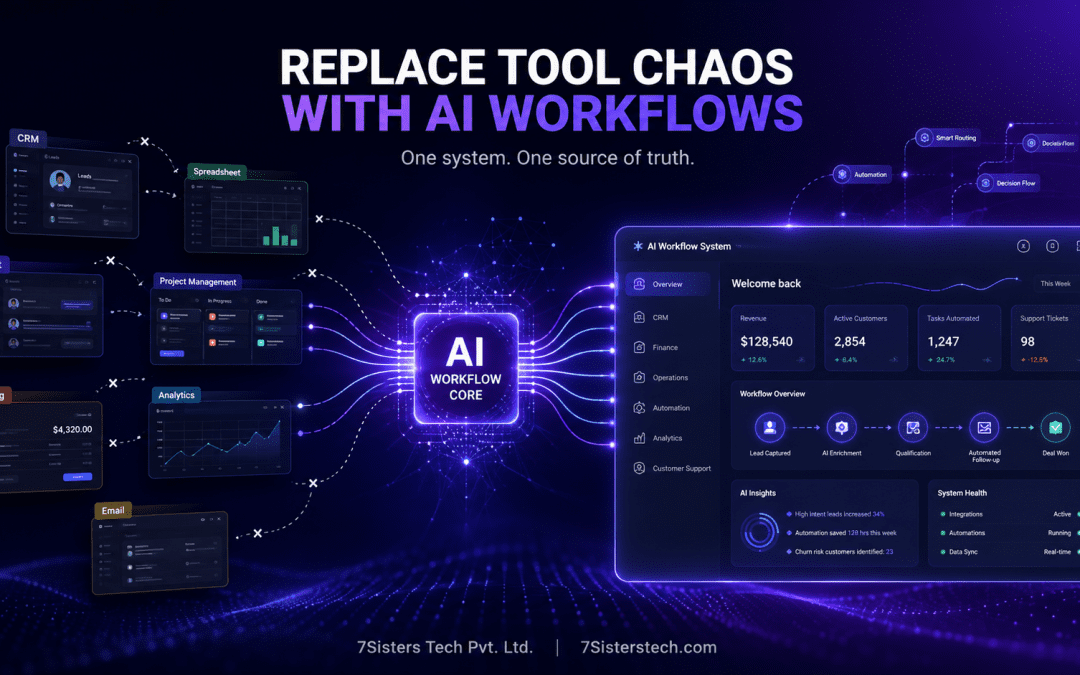
The average mid-market business now relies on between eight and fourteen SaaS applications. Each tool solves one problem well, so adding more tools feels logical at first.
However, this approach creates serious operational issues over time.
Monthly software costs quickly grow to five, ten, or even twenty thousand dollars. Meanwhile, data gets trapped inside disconnected systems. Teams spend hours managing integrations instead of focusing on meaningful work. Eventually, nobody knows where the real source of truth actually lives.
This is the modern SaaS trap.
In 2026, forward-thinking companies are finding a different path. They are not switching to another SaaS platform, and they are not buying oversized all-in-one software suites either.
Instead, they are building custom AI workflow systems designed specifically around how their businesses operate.
The Core Issue: Why This Matters Now
One system. One unified data model. One workspace for operations, communication, reporting, and automation.
More importantly, intelligence is built directly into every workflow.
Here’s the surprising reality: many companies discover this approach costs less than maintaining a fragmented SaaS stack.
This shift is no longer theoretical. Over the past eighteen months, companies across the USA and Canada have started replacing disconnected software ecosystems with centralized AI-powered business systems.
Most of these companies share the same characteristics:
- more than $5,000 per month in SaaS costs
- complex workflows across multiple tools
- operational bottlenecks caused by integrations
- growing frustration from internal teams
If that sounds familiar, this guide will help you understand why businesses are making the transition now
The Problem Nobody Talks About: The True Cost of Your SaaS Stack
When companies estimate their software costs, they are usually wrong.
Most businesses calculate only their largest subscriptions or the tools leadership sees directly. In reality, the actual spending is often thirty to fifty percent higher than expected.
Here’s what a typical SaaS stack looks like for many mid-market companies:
- Salesforce or HubSpot: $15,000–$20,000 per year
- Google Workspace or Microsoft 365: $2,000–$5,000 annually
- Slack: roughly $2,000 yearly
- Project management tools like Asana or Monday: $2,000–$5,000
- Zapier or Make integrations: $200–$600 monthly
- Analytics, automation, and communication platforms: additional recurring costs
Payment processing becomes another major expense.
Stripe, for example, charges approximately 2.9% plus 30 cents per transaction. For a company processing one million dollars annually, payment processing fees alone can reach thirty to forty thousand dollars each year.
Then come the hidden operational costs.
Teams spend hours fixing integrations, syncing duplicate data, searching across systems, and manually updating workflows. As more tools get added, complexity increases even faster.
Eventually, the software stack becomes difficult to manage. Information gets fragmented. Reporting becomes unreliable. Operational visibility disappears.
This is where SaaS sprawl starts affecting real business performance.
The Real Number: What Most Companies Actually Spend
When businesses calculate the full picture, the numbers become surprisingly large.
Most mid-market companies spend between $5,000 and $20,000 every month on SaaS subscriptions, integrations, automation platforms, and operational software.
That equals roughly $60,000 to $240,000 per year.
However, the real cost goes beyond subscription fees.
The bigger problem is operational inefficiency.
Teams waste valuable time switching between systems, fixing broken integrations, searching for accurate information, and manually updating workflows. As the software stack grows, productivity slows down instead of improving.
Eventually, businesses reach a point where the tools designed to improve efficiency start creating operational friction instead.
The AI Workflow Solution: Building One System Instead of Buying Many
Something important changed in 2026.
For the first time, AI became advanced enough and affordable enough that building one custom workflow system can cost less than managing multiple disconnected SaaS tools.
This shift is not about using AI for hype. Instead, businesses are using AI to connect workflows, automate operations, and create one unified business system.
The result is fewer tools, fewer integrations, and better operational visibility.
What a Unified AI Workflow System Looks Like
Imagine your sales team closing a deal inside one centralized platform.
The system instantly:
- creates customer records
- updates revenue forecasts
- schedules onboarding calls
- sends welcome emails
- syncs accounting data
- updates CRM activity
No duplicate entries. No platform switching. No missing information.
Support teams also work more efficiently.
Instead of checking multiple tools, one dashboard displays customer history, billing activity, projects, communication records, and support requests in one place.
AI can prioritize urgent tickets, recommend solutions, and help teams respond faster using historical business data.
Finance and marketing improve as well.
Revenue gets categorized automatically, forecasts update in real time, and teams gain accurate visibility into customer acquisition costs, churn risks, and growth opportunities.
Why Businesses Are Making the Shift
AI-powered workflow systems are no longer experimental technology.
Today, companies are actively building platforms using GPT-4, Claude, and modern AI models capable of managing complex business operations across multiple systems.
More importantly, the economics now make sense.
For many growing companies, building a centralized AI workflow platform costs less over time than maintaining fragmented SaaS subscriptions, integration tools, and disconnected workflows.
That’s why more businesses are replacing fragmented SaaS stacks with unified AI business systems in 2026.
The Math: Why Custom AI Workflows Cost Less Than Your Current SaaS Stack
This is where the decision becomes practical instead of theoretical.
A typical 15–30 person company often spends between $5,000 and $10,000 every month on SaaS tools, integrations, communication platforms, and workflow software.
That includes:
- Salesforce or HubSpot
- Google Workspace or Microsoft 365
- Slack
- Asana, Monday, or Linear
- Zapier or Make
- Stripe fees
- Analytics and automation tools
For many businesses, annual software spending quickly reaches $60,000 to $120,000.
However, subscriptions are only part of the cost.
Teams also lose hours every week managing integrations, fixing workflows, updating duplicate records, and searching across disconnected systems.
The Cost of Building a Custom AI Workflow System
A custom AI workflow platform typically includes:
- workflow discovery and planning
- backend infrastructure
- AI integrations
- automation systems
- centralized dashboards
- data connectors
Most projects range between $80,000 and $150,000 depending on complexity.
Annual maintenance usually costs $12,000 to $20,000.
The Three-Year Comparison
Over three years, many companies spend:
$240,000–$360,000 on SaaS subscriptions
plus thousands more in operational inefficiency
In comparison, a custom AI workflow system often costs:
$119,000–$198,000 over the same period
At the same time, businesses recover dozens of productivity hours every month through automation and workflow consolidation.
Why Companies Are Switching
The difference is substantial.
Custom AI workflow systems can reduce long-term operational costs by 30–50% while giving businesses:
- one unified platform
- better workflow automation
- centralized data
- fewer integration issues
- full ownership of their system
For companies already spending $8,000–$12,000 monthly on SaaS, the investment often pays for itself within 12–18 months.
A Real Example: How a Marketing Agency Replaced Eight Tools With Custom AI
One marketing agency in Toronto was spending nearly $14,000 every month across eight different SaaS platforms.
Their stack included:
- Salesforce
- HubSpot
- Asana
- Slack
- Zapier
- Stripe
- Intercom
- analytics and reporting tools
The bigger problem wasn’t just cost. Their team wasted hours managing integrations, creating duplicate records, and manually moving information between systems.
To solve this, they built one custom AI workflow system designed specifically for their operations.
The new platform unified:
- client management
- project tracking
- communication
- billing
- reporting
- onboarding workflows
When a new client signs up, the system now automatically:
- creates records
- schedules onboarding
- sends emails
- updates project timelines
- routes communication to the right team
The result was significant.
They removed all eight SaaS subscriptions, recovered their investment within nine months, and now save over $140,000 annually.
More importantly, their team spends less time managing tools and more time doing meaningful client work.
That’s why more companies are moving toward custom AI workflow systems in 2026.
When Custom AI Workflows Make Sense For Your Business
When Custom AI Workflows Make Sense For Your Business
Custom AI workflow systems are not the right fit for every company.
They usually make sense when:
- your business spends more than $5,000 monthly on SaaS tools
- multiple systems need constant integration
- your workflows are stable and repeatable
- your team loses time managing disconnected tools
- your company has steady growth and operational complexity
Businesses with complex workflows often benefit the most from consolidation and automation.
However, custom systems are not ideal for early-stage startups still changing processes every month. If your business model is evolving rapidly, traditional SaaS tools provide more flexibility.
They also may not make sense if:
- your SaaS costs are still low
- your workflows are unclear
- you rely heavily on specialized platforms
- your team depends on familiar third-party tools
When SaaS Tools Are Still the Better Option
SaaS platforms still work well for many businesses.
If your company is small, experimenting with workflows, or spending less than $5,000 monthly on software, sticking with SaaS is usually the smarter financial decision.
Tools like Salesforce, Slack, Asana, and HubSpot remain valuable because they are:
- easy to deploy
- familiar to teams
- scalable
- optimized for collaboration
In many cases, the best approach is not replacing every SaaS tool immediately. Instead, businesses gradually consolidate operations where custom AI workflows provide the highest value.
The Decision Framework: Should You Build Custom AI Workflows?
Before investing in a custom AI workflow system, businesses should evaluate a few key areas honestly.
Start with your software spending.
Many companies underestimate how much they actually pay for SaaS tools, integrations, and subscriptions. Review your expenses carefully and calculate the real monthly cost.
Next, identify where most of the spending goes. In many cases, platforms like Salesforce or HubSpot consume a large portion of the software budget.
Then look at operational inefficiency.
How much time does your team spend:
- fixing integrations
- updating duplicate records
- switching between platforms
- searching for information
If teams lose dozens of hours every month managing tools, workflow consolidation may deliver significant value.
You should also evaluate:
- business growth
- workflow stability
- internal capacity for implementation
Custom AI workflows work best for businesses with stable operations, growing teams, and clear processes.
A Simple Rule of Thumb
A custom AI workflow system usually makes sense if:
- your SaaS costs exceed $5,000 monthly
- your workflows are repeatable
- multiple systems need constant integration
- your team struggles with operational inefficiency
If your business is still evolving rapidly, traditional SaaS tools are often the better short-term choice.
How to Evaluate Whether Your Workflows Are Good Candidates for Custom Systems
Not every workflow needs customization. However, some processes benefit significantly from automation and system consolidation.
Your workflows may be strong candidates for a custom AI system if:
- data moves between multiple tools
- teams repeatedly enter the same information
- employees manually trigger tasks or reminders
- reporting requires data from several platforms
- spreadsheets are being used as operational databases
For example, if customer information flows between CRM, accounting, support, and project management tools, a unified workflow system can reduce manual work and improve accuracy.
Custom systems also perform well for businesses with repetitive operational workflows.
When SaaS Tools Still Work Better
In some cases, specialized SaaS platforms already handle workflows effectively.
For example:
- email marketing tools
- external collaboration platforms
- highly specialized analytics software
In these cases, keeping the existing SaaS solution may be the better choice.
The goal is not replacing every tool. Instead, businesses should consolidate the workflows creating the most operational friction.
The Implementation Path: Moving From SaaS to Custom AI Workflows
Transitioning from multiple SaaS tools to a custom AI workflow system usually happens in four phases.
Phase 1: Discovery and Planning
The first step is understanding how your business operates.
During this phase, teams:
- map workflows
- identify integration points
- define automation requirements
- prioritize operational bottlenecks
Typically, this stage takes two to four weeks and helps prevent costly development mistakes later.
Phase 2: Development and Integration
During the next phase, the development team builds the platform.
This includes:
- backend infrastructure
- AI integrations
- workflow automation
- dashboards and user interfaces
- system integrations
Most development projects take four to eight weeks depending on complexity.
Phase 3: Migration and Training
Once the system is ready, businesses migrate existing data and train teams on the new platform.
For a short period, both systems usually run together to ensure everything works correctly before fully replacing the old tools.
Phase 4: Optimization and Maintenance
After launch, the system continues improving over time.
Businesses typically:
- refine workflows
- add new automations
- update integrations
- monitor performance
- improve user experience
In most cases, the complete transition takes around 10–14 weeks without disrupting daily operations.
Questions Companies Ask When Considering Custom AI Workflows
What happens if SaaS platforms change?
Custom systems may require updates if platforms like Salesforce or HubSpot change their APIs. However, well-built systems are designed to handle updates without major rebuilds.
Most businesses only need small maintenance updates each month.
Are custom AI systems secure?
Yes. Custom systems can be built with enterprise-grade security, including:
- encrypted data
- secure authentication
- automated monitoring
- compliance support for HIPAA, GDPR, or SOC2
Many companies prefer custom systems because they maintain greater control over their data and infrastructure.
Can new integrations be added later?
Absolutely.
Modern custom AI workflow systems are usually modular, making it easier to connect new tools or services as the business grows.
What if the business changes later?
Custom systems can evolve over time. However, stable workflows usually deliver the best long-term return on investment.
That’s why planning and workflow discovery are important before development begins.
How are backups and disaster recovery handled?
Well-designed systems include:
- automated backups
- recovery testing
- failover protection
- infrastructure monitoring
This helps businesses recover quickly if technical issues occur.
Why 2026 Is Different: The Convergence of Technology, Economics, and Business Maturity
2026 is different because three major shifts are happening at the same time.
First, AI technology has matured rapidly. Models like GPT-4 and Claude can now handle complex workflows, understand business context, and automate tasks that previously required additional staff. As a result, AI workflow automation has become practical for real business operations.
Second, the economics now make sense. Cloud infrastructure is more affordable, development is faster, and maintaining one custom AI workflow system can cost less than paying for multiple SaaS subscriptions over time.
Finally, businesses themselves are more prepared for this transition. Many companies now understand their workflows clearly, have stable operations, and are increasingly frustrated by fragmented software stacks and disconnected systems.
Because of these changes, more growing businesses are replacing complex SaaS ecosystems with unified AI-powered workflow platforms.
If your company has stable workflows, rising SaaS costs, and operational complexity, 2026 may be the right time to consider a custom AI workflow system.
Getting Started: Your Next Steps
If you’re considering a custom AI workflow system, the first step is understanding your current operations.
Most businesses begin by reviewing:
- the tools they use
- monthly SaaS spending
- workflow bottlenecks
- integration problems
- operational inefficiencies
After that, a development team evaluates whether your workflows, growth stage, and business processes are suitable for consolidation and automation.
When the opportunity looks promising, the next step is a discovery phase.
During discovery, teams:
- map workflows
- identify integrations
- define automation goals
- estimate timelines and costs
Typically, this process takes two to four weeks and helps businesses understand exactly what a custom AI workflow platform would require.
Afterward, companies can decide whether to move forward with development or continue optimizing their existing SaaS stack.
Most importantly, businesses should make this decision intentionally instead of continuously adding disconnected tools over time.
In 2026, workflow efficiency directly affects operational cost, productivity, and long-term scalability.
Disclaimer: All software pricing and figures mentioned in this article are based on research and market data for 2026. Actual costs may differ based on your plan, usage, and location. Please verify current pricing directly with software vendors. These are illustrative examples only.
Conclusion: The Future of Business Software
Business software is changing rapidly in 2026.
For years, companies relied on multiple SaaS tools connected through integrations and manual workflows. While that model still works for some businesses, growing companies are increasingly facing higher software costs, fragmented data, and operational inefficiencies.
As a result, many organizations are moving toward custom AI workflow systems built specifically around their operations.
These systems help businesses:
- consolidate workflows
- reduce software complexity
- automate repetitive tasks
- improve operational visibility
- centralize business data
In many cases, custom AI platforms also reduce long-term operational costs compared to maintaining multiple disconnected SaaS subscriptions.
Companies adopting this approach often gain:
- faster internal operations
- better decision-making
- improved team productivity
- fewer integration issues
If your business spends heavily on SaaS tools and struggles with disconnected workflows, 2026 may be the right time to explore a unified AI workflow system.
About 7Sisters Tech
7Sisters Tech specializes in building custom AI workflows, SaaS platforms, and business automation software for companies across the USA, Canada, and beyond. We’ve helped companies transition from fragmented SaaS stacks to unified custom systems. We understand the specific challenges of consolidating data across systems, automating complex workflows, and building software your team actually enjoys using.
If you’re considering a custom AI workflow system, we offer free consultations to discuss your situation, answer questions, and help you determine whether now is the right time for this transition.
Book your free 30-minute SaaS scoping call – and get a written cost estimate within 48 hours.
Frequently Asked Questions About Custom AI Workflows
How long does it take to build a custom AI workflow system?
How much does it cost to build a custom AI workflow system?
Will a custom system be harder to use than my current SaaS tools?
What if something breaks? Is maintenance expensive?
Can I still use my favorite SaaS tool if I build a custom system?
What if my business model changes significantly?
Who owns the custom system I build?
Next Steps: Getting More Information
If you’d like to explore whether a custom AI workflow system makes sense for your company, reach out to 7Sisters Tech. We offer free thirty-minute consultations where we discuss your specific situation, answer questions, and help you determine whether now is the right time to make this transition.
Book a consultation directly online, or email us at hello@7sisterstech.com with details about your company and current software setup. We’ll get back to you within one business day.
The future of business software is custom systems built specifically for how your business actually works. The question isn’t whether this approach makes sense for companies with significant SaaS spending. The question is whether now is the right time for your company to make the transition.
We’re here to help you answer that question.
Best Related Blog Titles
React Native vs Flutter for Startups in 2026: Cost, Performance, Hiring & Long-Term Maintenance
Building a startup mobile app is no longer just about having a great idea. The technology you choose can directly affect your development budget,...
Clinic management software in 2026: should US clinics buy off-the-shelf or build custom?
Most US clinic owners choose their clinic management software the same way - they Google "best clinic management software," read a comparison...

How to outsource software development to India: the complete guide for US and Canadian companies in 2026
Hiring a full-time senior software engineer in the US costs between $130,000 and $190,000 per year in salary alone - before benefits, recruitment...